Try Odysseus online without Docker setup
Try Odysseus Online
Without Installation
Odysseus Online is a free hosted demo platform that lets you experience the Odysseus AI workspace without Docker installation. Chat with AI models, run autonomous agents, perform deep research, manage files, and explore self-hosted AI workflows directly in your browser.
Explore the same core workflows users look for in a self-hosted AI workspace.
Try the browser demo before cloning GitHub and running the Docker install.
Review model comparison, file workflows, memory, tools, and research examples in one place.
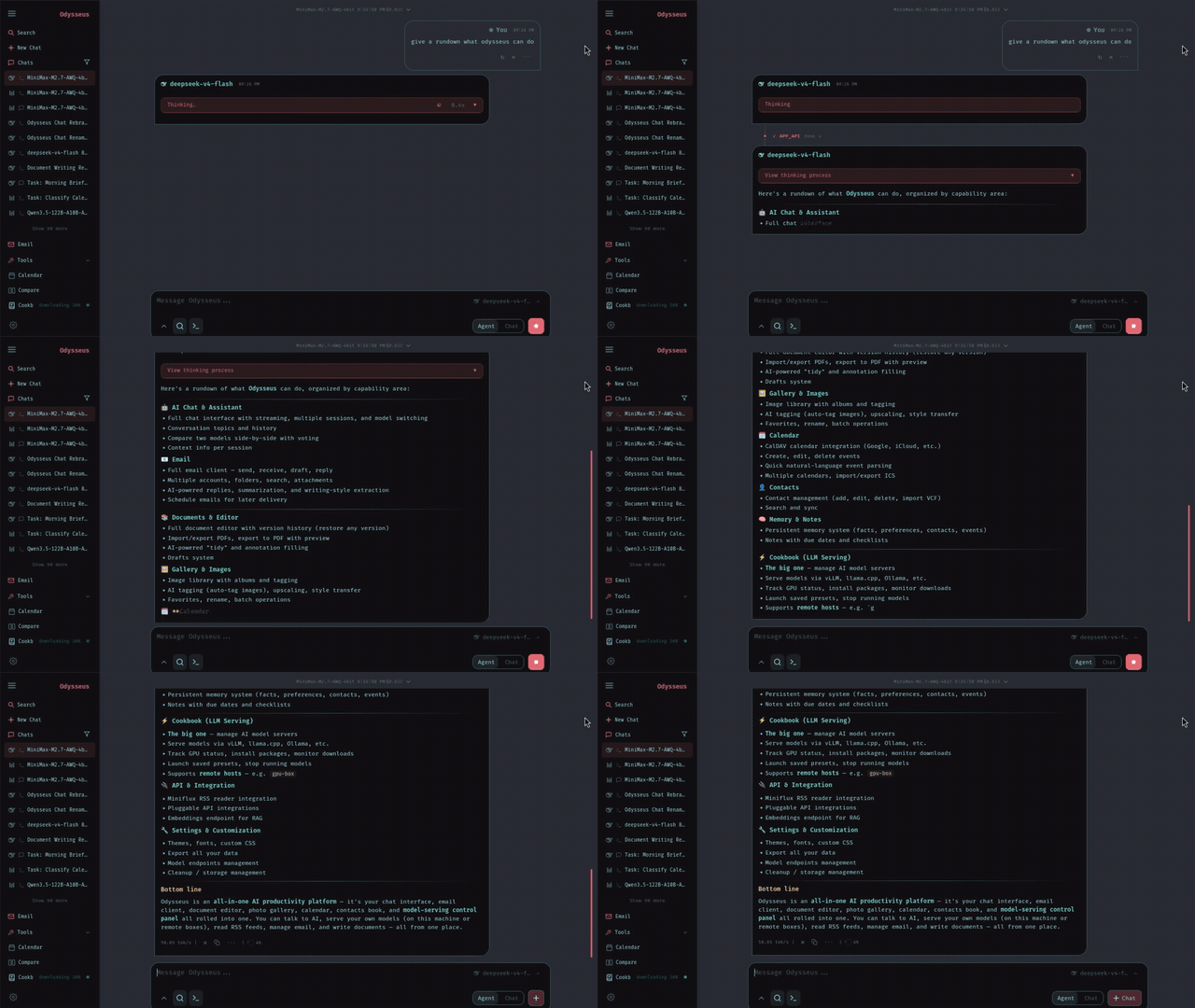
Hover-to-play tour: chat, agents, research, compare, documents, and tasks
Chat & Agents
Talk to any local model or API, then give the agent tools and let it work through the task.
Everything you need to evaluate Odysseus before self-hosting
The hosted demo focuses on the workflows people search for most: AI chat, autonomous agents, deep research, files, memory, model comparison, and practical Docker setup guidance.
Chat and autonomous agents
Start with regular AI chat, then hand tasks to agents that can plan, use tools, and work through multi-step requests.
Files, documents, notes, and tasks
Odysseus is a workspace, not only a chat box. The demo shows how files and task context become part of the AI workflow.
Model comparison and provider flexibility
Compare model responses and learn how Odysseus connects to local models or external endpoints when self-hosted.
Hosted browser demo
Try the Odysseus experience online before touching Docker, environment variables, or server setup.
Deep research workflows
Run multi-step research examples that gather sources, synthesize findings, and turn them into readable reports.
Docker and GitHub install path
Use the tutorial flow to move from hosted evaluation to the official self-hosted Odysseus repository.
From online demo to your own Odysseus workspace
Odysseus Online is designed as the low-friction first step. Use it to understand the product, then move to the open-source GitHub project when you want full local control.
Hosted first, self-hosted when ready
The online workspace reduces the guesswork. Once you know the modules you need, the Docker install becomes a planned next step instead of a blind setup.
Explore model workflows now, keep self-hosted control later
The hosted demo helps you understand Odysseus workflows. The self-hosted project is for users who want their own hardware, model endpoints, local data, and privacy-first operation.
Multiple model workflows
Test chat and comparison flows so you can decide which local or API-backed models make sense for your own workspace.
Hosted evaluation
Use the online demo for quick product evaluation, tutorials, and first-run learning before setting up Docker.
Bring your own endpoints
When self-hosting, connect your preferred model providers or local runtimes according to the official Odysseus setup path.
One interface for chat, agents, research, files, memory, and tasks
Odysseus is positioned as a full AI workspace. The hosted experience keeps the major modules visible so users can understand how the pieces fit before installing locally.
Chat and agents
Move from direct model conversations to agentic tasks with tools, files, and planning.
Research and compare
Run research-style workflows and compare model outputs before committing to a self-hosted model stack.
Files and daily work
Use files, notes, documents, and tasks as part of the workspace rather than keeping context scattered across tools.
Agent states
Track AI work from request to report
The agent is reading context, using tools, and building an answer.
A task is waiting for workspace resources or the next available run.
A workflow can wait while you review setup choices or inputs.
Errors and missing context are surfaced so the next step is clear.
Install Odysseus locally when the hosted demo matches your workflow
The tutorial path connects the hosted demo to the official GitHub repository and Docker setup. Use it when you are ready for a private, local-first AI workspace.
Try the hosted demo
Use Odysseus Online to inspect chat, agents, research, documents, memory, and model comparison before installing.
Clone the GitHub project
Open the official repository and pull the source when you are ready to self-host.
Start with Docker Compose
Use the Docker path from the project README to launch the workspace and review startup logs.
Configure models and tools
After the instance is running, connect model endpoints, tool access, search, files, and workspace preferences.
Choose the hosted workspace path that fits your evaluation
Start with the free demo, then use optional hosted plans if you need managed workspace access, more guided usage, or team evaluation time.
Simple, Transparent Pricing
Choose the plan that works best for you. All plans include access to our core features.
Standard
For individuals evaluating Odysseus online.
- Hosted Odysseus workspace access
- Chat, agents, research, and files
- Credit-based workspace runs
- Priority workspace processing
- Workspace output export
- Private workspace history
- Standard workspace queue
- Personal and team evaluation
Pro
For users running more Odysseus workspace tasks.
- Hosted Odysseus workspace access
- Chat, agents, research, and files
- Higher monthly workspace credit pool
- Priority workspace processing
- More guided workspace volume
- Workspace and API access
- Fast workspace queue
- Priority support
Max
For teams evaluating Odysseus at higher volume.
- Hosted Odysseus workspace access
- Chat, agents, research, and files
- Largest monthly credit pool
- Priority workspace processing
- Team-scale volume
- Workspace access and support
- Instant workspace queue
- Workspace and API access
Frequently asked questions
Answers for users searching Odysseus online, Odysseus demo, Odysseus Docker, and self-hosted AI workspace setup.
Built for people evaluating self-hosted AI workspaces
Odysseus Online is most useful when you want to understand the workspace before committing time to local setup, model configuration, or server deployment.
Questions about Odysseus Online, the hosted demo, or self-hosted setup path?
Reach out for demo access, tutorial feedback, hosted workspace questions, or practical setup guidance before you run Odysseus locally.